
When it comes to choosing the perfect Apple Watch band, knowing your watch’s model is crucial to ensuring compatibility. Fortunately, it's easy to figure out which Apple Watch you own, and you can do it directly from your watch or your paired iPhone. In this simple guide, we’ll walk you through how to identify your Apple Watch model using the iPhone’s Apple Watch app.
Follow these easy steps, and you'll be ready to find the perfect band in no time!

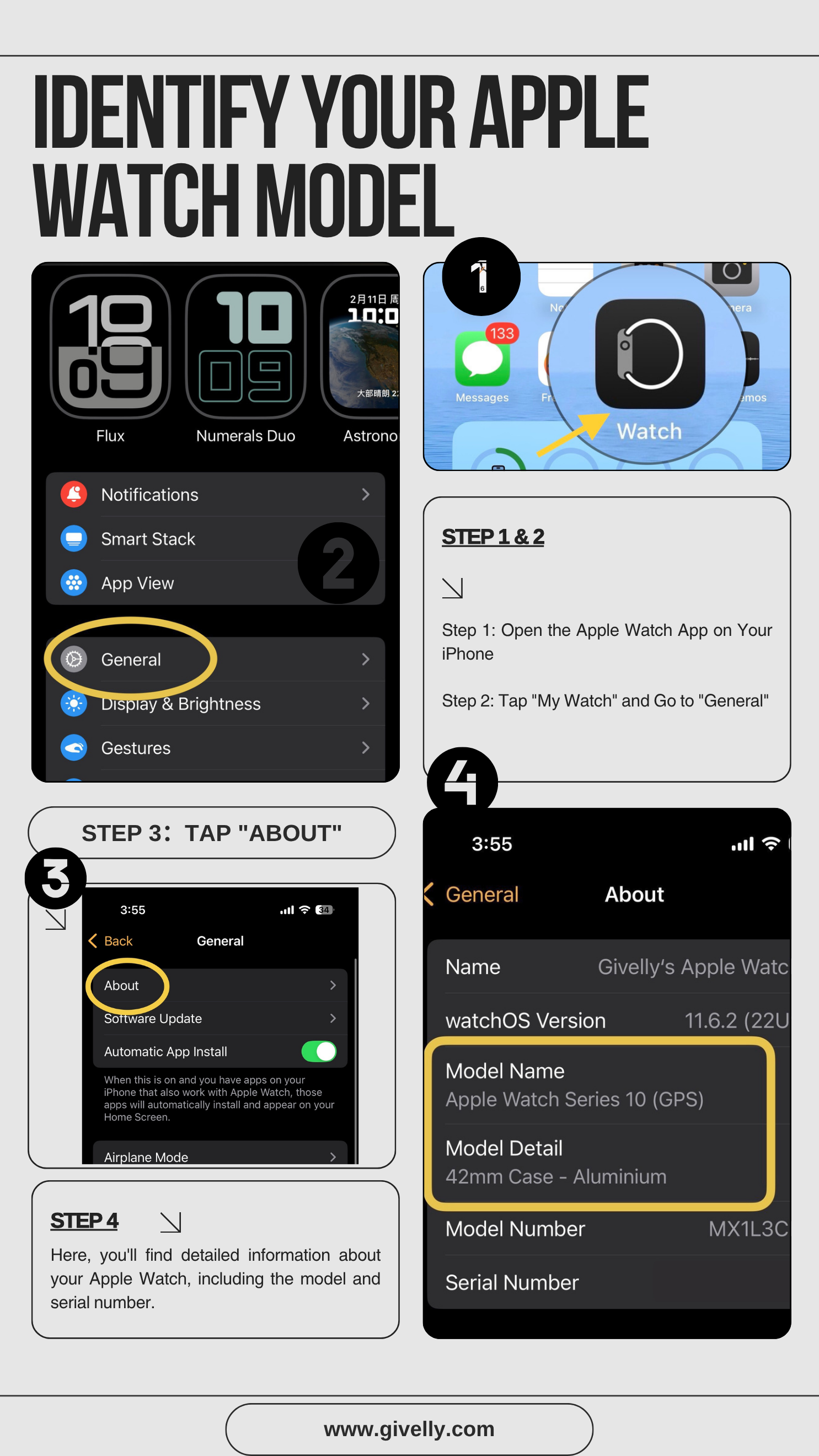
Step 1: Open the Apple Watch App on Your iPhone
To start, make sure your Apple Watch is paired with your iPhone. Then, follow these steps:
-
Open the Apple Watch app on your iPhone (it's the app with a black icon and a white watch outline).
Image Suggestion: Screenshot showing the Apple Watch app icon on the iPhone home screen.
Step 2: Tap "My Watch" and Go to "General"
- In the Apple Watch app, tap on "My Watch" at the bottom of the screen.
-
Scroll down and tap "General".
Image Suggestion: A screenshot showing the "My Watch" and "General" sections of the Apple Watch app.
Step 3: View Model Information Under "About"
- In the "General" section, tap "About".
-
Here, you'll find detailed information about your Apple Watch, including the model and serial number.
The model information will typically appear as something like "Apple Watch Series 6" or "Apple Watch SE." This also includes the size of the watch (40mm or 44mm).
Image Suggestion: A screenshot showing the "About" section in the Apple Watch app, highlighting the Model and Size fields.
Way 2: Check the Back of Your Apple Watch
If you don’t have your iPhone with you or prefer to check directly on the watch, you can look at the back of the Apple Watch.
- Flip your Apple Watch over, and you’ll see small engraving on the back.
- So you can find the model name and mode

Why Knowing Your Apple Watch Model Matters
Understanding your Apple Watch model is essential for choosing the right accessories, especially when it comes to selecting a compatible band. Each series of the Apple Watch has slightly different design features, and knowing your model ensures that you choose a band that will fit perfectly.
For example, newer models like the Apple Watch Series 7 and 8 have larger displays, while the Apple Watch SE and Series 3 are smaller, which means bands for the larger models won't fit the smaller ones and vice versa.
Final Thoughts: Easy and Quick
With just a few taps on your iPhone, you’ll have the information you need to make the right decision when shopping for Apple Watch bands. Knowing your watch’s model will help you avoid mismatched sizes and ensure your new band fits seamlessly, so you can enjoy both comfort and style.
We hope this guide helps you navigate the process of identifying your Apple Watch model! Now you’re one step closer to finding the perfect band for your style and needs.


Share: